A password is your first line of defense against cybercriminals – the key to your data, accounts, and digital identity. Make sure it is sufficiently strong. How do you create a password that truly ensures your safety? Below, you will learn where to start, what mistakes to avoid, and how to store your passwords.
What Makes a Password Strong?
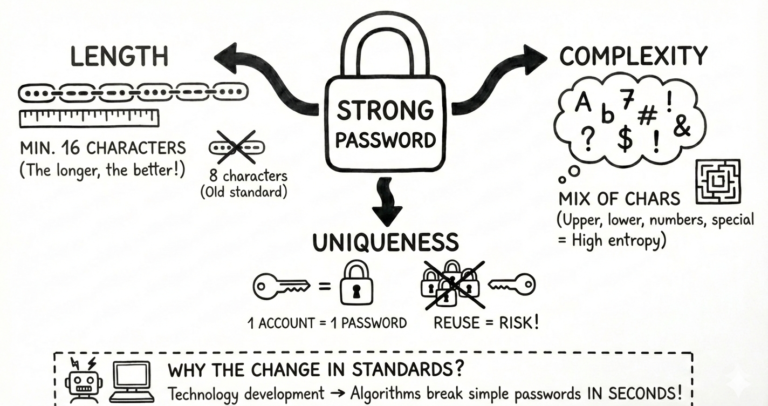
To achieve the status of a so-called „strong password,” it must meet specific security criteria, making it resistant to threats such as brute force attacks.
Features of a strong password:
- Appropriate length – minimum 16 characters, but the longer, the better.
- High complexity – a combination of uppercase and lowercase letters, numbers, and special characters; the higher the entropy, the harder it is to crack.
- Uniqueness – one password = one account. Duplicating the same password in multiple places is a huge risk!
These features remain constant, although the parameters considered „standard” may change. Just a few years ago, an 8-character password was considered safe, but technological development has changed this significantly. Today, password-cracking algorithms can decipher short and simple combinations in seconds. Therefore, using long and random passwords is key.
What Mistakes Should You Avoid?
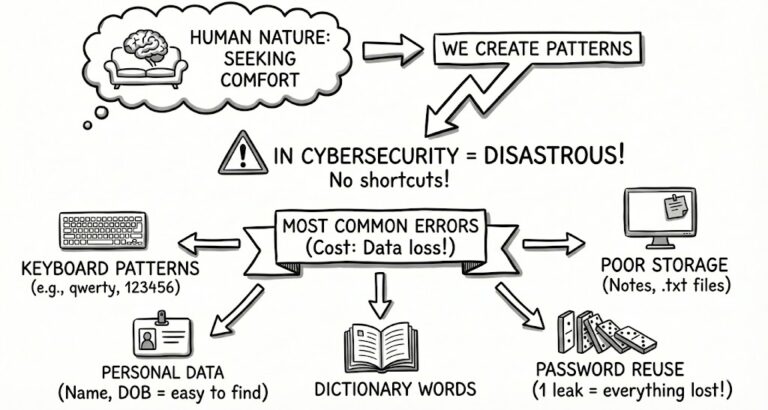
As humans, we don’t like to complicate our lives, so we create and replicate patterns – which turn out to be disastrous in terms of cybersecurity. There are no compromises or shortcuts here. Below you will find a list of the most common mistakes that could cost you your data:
- Keyboard patterns: They may be convenient to use and remember, but they are very well known to cybercriminals (e.g., zaq12wsx, 123456, qwerty).
Personal data in passwords: Using your own name, date of birth, or place of residence makes passwords easy to guess, especially if your data is available on social media.
- Using dictionary words: Unless you are consciously using passphrases, which prioritize the length of the string above all else.
- Improper storage: Notes in your phone, unsecured .txt files, or sticky notes on your desk are a ready-made recipe for disaster.
- Reusing passwords: Using the same password in multiple places means that a leak from one service can result in unauthorized access to all your accounts.
Best Practices for Staying Safe in Cyberspace
Creating a strong password is not everything. It is worth using solutions that additionally raise the security level and allow for the automation of certain processes. Below we have prepared a list of ready-made solutions and safeguards worth using:
- Enable Two-Factor Authentication (2FA).
- Monitor password leaks (e.g., on haveibeenpwned.com).
- Use password generators that create complex strings for you.
- Use password managers that relieve you of the duty of remembering everything.
Password Manager – How to Store Them Safely
A password manager is a solution that increases cyber-resilience without requiring the user to have specialized cyber-knowledge or skills. perc.pass is designed for every individual user of electronic devices, but it also meets corporate requirements by facilitating teamwork.
Modern password managers focus on user convenience. They allow you not only to store passwords safely based on strong cryptography standards but also offer extended capabilities such as built-in password generators, mechanisms for automatically monitoring leaks, and autofilling login data with a single click.
Want to learn more about the first Polish password manager – perc.pass? Click here and secure your data for free.