

An analysis of data breaches conducted by Cybernews in 2025 revealed over 19 billion exposed login records, with as many as 94% of them being passwords that were reused or duplicated across different services. This is the main problem with passwords. It is not about their complexity, but ther uniqueness. Despite this, only about 30% of internet users use a password manager.
- What of the password manager gets hacked?
- Does the provider company see my passwords?
- What if I forget the master password?
These ar ethe questions holding back your decision, and we have answers for them based on technical architecture and data.
Below, we discuss the most common concerns regarding password managers and explain why, in every case, operating without a password manager is riskier.
What if the password manager gets hacked – will I lose everything?
This is the most popular concern, which at first glance seems logical. A single point of failure, one attack, and everything is gone. In reality, however, the security architecture of a good password manager ensures that even a successful attack on the provider’s servers does not mean your data is exposed.
How AES-256 encryption and the zero-knowledge model work
A password manager encrypts your data locally, on your device, before sending it to the cloud. Perc.pass uses AES-256 and RSA algorithms for this – the standard utilized by financial institutions and government agencies worldwide. An encrypted string of data arrives on the provider’s servers, which is entirely useless without the decryption key.
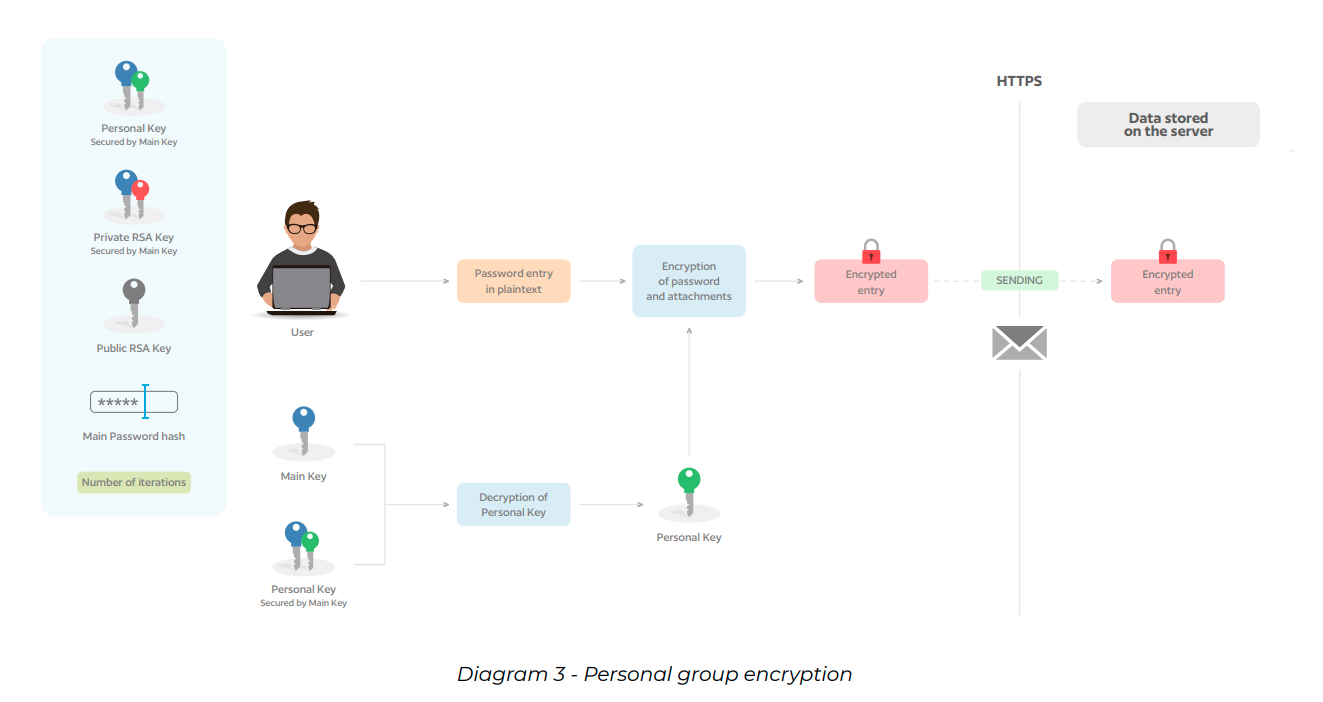
The encryption key is derived from your master password. The provieder does not know it, does not store it, and connot recreate it. The zero-knowledge model is a guarantee that no one but you has the technical capability to read your passwords.
What the LastPass breach revealed
In 2022, one of the most high-profile incidents in the history of password managers occured. Attackers gained access to the encrypted vaults of LastPass users. It sounds alarming, but the key lies in the details. The data was encrypted with a key derived from the user’s master password, which LastPass did not store.
Users who employed strong, unique master passwords and had multi-factor authentication (2FA) enabled reamained secure (for as long as it would take to crack the master password; it it was long and complex, the time required to crack it was simply too long, meaning in practice it wasn’t worth attempting). The incident exposed vulnerabilities in LastPass’s infrastructure, but at the same time, it confirmed that properly implemented encryption works as intended. A well-designed password manager is built precisely so that a breach of its servers does not equate to a breach of your data.
Can the provider see my passwords?
The answer is NO – as long as the provider has actually implemented a zero-knowledge architecture, rather than just using the term in marketing materials.
Zero-knowledge in practice
The zero-knowledge model is not a philosophy, but a concrete engineering decision. Encryption and decryption occur exclusively on the client side, meaning on your device. Only an encrypted string of data ever reaches the servers. The provider company does not possess the keys, does not record master passwords, and cannot perform the reverse operation.
In practice, this is verified through security audits conducted by independent companies. Reliable providers regularly subject their systems to such audits and publish the results. This is one of the clear indicators of quality worth checking before choosing a tool.
What if I forget the master password – will I lose access to all accounts?
The master password is the only password you need to remember. It is also the point that raises the most fear among people considering a manager’s deployment. The scenario is unsettling: one forgotten password, no access to anything.
But this is the very core of password manager’s security. If there were a way to recover the master password, bypass it, or recreate it, that would represent a potential vulnerability that could compromise and directly impact the security level. This is why it is vital to keep your master password in a secure place.
How to securely store your master password
One simple rule: write the master password down physically and store it in a secure place outside the digital ecosystem – at home, in a locked drawer, away from internet-connected devices. It sounds archaic. It is effective. A remote attacker has no access to a piece of paper in your desk.
Keeping all passwords in one place is a risk – one attack and it's all over?
This is an intuition that seems logical on the surface. In reality, it reverses the actual hierarchy of risk.
The security paradox: password dispersion is a greater threat than an encrypted safe
Let us consider the alternative – a complete lack of a password manager and the reuse of a handful of passwords across dozens of services. Research shows that the average user repeats a password across an average of five different platforms. A single breach from any service, even one that seems minor, opens the way to hijacking the remaining accounts via credential stuffing (the automated testing of stolen credentials across other services).
In a centralized, encrypted safe, every password is unique and strong. A leak from one service provides no useful information to an attacker regarding the other accounts.
How 2FA eliminates this problem
Event if an attacker somehow obtained your password, you can configure two-factor authentication (2FA) on the account, which blocks access without the second factor. According to data from Microsoft, enabling multi-factor authentication blocks over 99% of bulk account attacks. A centralized safe with 2FA is a significantly harder target that dozens of account secured with repetitive, weak passwords.
I don’t trust the cloud, I prefer to keep my passwords locally
Skepticism toward the cloud is understandable, especially with highly sensitive data. The question is, however: is storing passwords locally actually a safer alternative?
Local vs. cloud managers – what is actually more exposed
Local password storage has one major weakness: a lack of synchronization and redundancy (unless you take care of it yourself). A hard drive failure, laptop theft, or liquid damage, and the data is gone forever. Local password files are vulnerable to the same threats as any other data on the device: ransomware, malware, and physical theft.
A cloud-based password manager with AES-256 encryption and zero-knowledge architecture stores encrypted data within a backed-up infrastructure. Even if a device is lost, access to the data remains possible. With a local solution lacking backups, unfortunately, it does not.
This is too complicated, I won't be able to handle it
Is a password manager difficult to use? This is a question worth testing before our intuition answers it for us.
What daily use of a password manager looks like
Following a one-time configuration that takes 15 to 30 minutes for a basic set of accounts, daily use is limited to a single action: unlocking the application with a master password or biometrics. The rest happens automatically.
When logging into a service, the manager recognizes the form and suggest autofilling the data. One click. When creating a new account, the password generator creates a strong, unique password and saves it. No remembering, no typing.
Setup time vs. time saved
The average user logs into various services a dozen times a day. Every login without autofill takes a minimum of 15-30 seconds to type the data (or 3-4 minutes on average to reset a forgotten password). On a monthly scale, a password manager can save hours of our time. The one-time setup pays for itself within a week.
What about phishing? Will the manager protect me?
This concern is technically justified; a password manager is not a solution to all threats. However, this does not mean it does not protect against phishing. It does, and in a way that a human cannot replicate independently.
Autofill as a natural phishing filter
The password manager fills in login credentials exclusively on the domain for which the password was saved. If a phishing site mimics a bank and operates under the address your-bank-login.com instead of yourbank.com, the manager simply will not suggest autofilling the data. It will register the URL mismatch and do nothing. For the user, this is a sign that should trigger a red flag.
A human, even a cautious one, can miss a typo in a URL. A password manager does not have this problem. In this regard, it is more precise that human perception.
Concerns regarding password managers are understandable. They stem from the intuition that centralizing sensitive data in one place increases risk. Meanwhile, the data and technical architecture show the true picture of security.
If you want to check how it works in practise – test perc.pass during a free TRIAL.